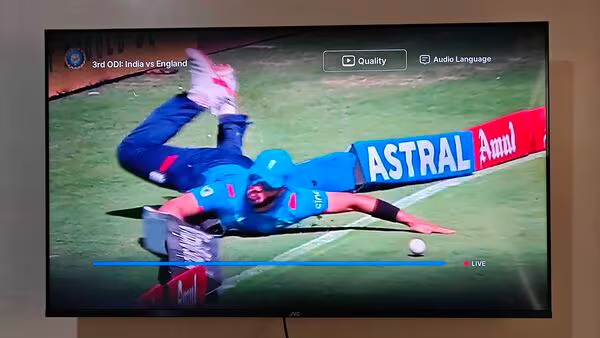
The much-awaited India vs England 3rd ODI match at the Narendra Modi Stadium in Ahmedabad took an unexpected turn for many viewers as users reported significant issues with the streaming on Disney+ Hotstar. Both mobile and TV users encountered several challenges, including poor streaming quality, the inability to switch between audio languages, and frustrating technical glitches that marred the viewing experience.
Streaming Quality and Language Issues Plague Disney+ Hotstar
As the India vs England 3rd ODI match progressed, viewers took to social media to express their frustration over the performance of Disney+ Hotstar. The most common complaints were related to the inability to adjust streaming quality and the default selection of Hindi commentary, which many viewers found inconvenient.
- Poor Streaming Quality:
One of the most significant issues faced by users was the poor streaming quality. Many complained of blurry or pixelated visuals, making it difficult to follow the match, especially during critical moments. Attempting to adjust the streaming quality on the Disney+ Hotstar app only led to a “stats for nerds” page instead of giving users the option to change video quality settings. - Inability to Change Commentary Language:
Another major complaint centered on the default setting of Hindi commentary. Several users reported that despite being premium subscribers, they were unable to switch the commentary language to English, or any other language of their preference. Attempts to change the audio settings on both the mobile app and the TV app were met with no response, leaving users stuck with Hindi commentary. One frustrated user wrote on social media, “In Hotstar, Why is it only showing in Hindi? I can’t change the streaming language, and the quality is also poor. I tried clearing the cache, but it still doesn’t work.” - Technical Glitches Impact Viewing Experience:
The technical issues did not stop there. Users reported that they encountered a blank screen or error messages when trying to access the audio settings to change commentary language. On the Disney+ Hotstar Android TV app, users were unable to select streaming quality or change the language settings, further contributing to the overall disappointment. Another user voiced their frustration, saying, “Dear @DisneyPlusHS, how do I change the commentary language for #INDvENG match? At least by default, it should be in English. What is the point of paying for a subscription?”
User Reactions and Growing Discontent
The growing number of complaints about the poor streaming experience on Disney+ Hotstar highlights a significant issue for users who have come to expect high-quality service for their paid subscriptions. Some viewers have even blamed the joint venture between Reliance Jio and Disney+ Hotstar for the decline in quality, with one user remarking, “Once @JioCinema took over @DisneyPlusHS, the quality of Hotstar has worsened. Why should we pay for subpar quality, like 280p, with only Hindi commentary?”
Several other users echoed similar sentiments, with many wondering why the default commentary is set to Hindi, despite the global reach of the platform. The inability to change language options has sparked a wider conversation about customer experience and language preferences in international sports broadcasting.
Possible Reasons Behind the Technical Glitches
While it’s difficult to pinpoint the exact reason for the technical glitches during the match, there are a few factors that may have contributed to the poor performance:
- High Traffic Load:
With millions of viewers watching the India vs England 3rd ODI, Disney+ Hotstar may have been experiencing server issues due to the sheer volume of traffic. This can often result in poor streaming quality and difficulty in accessing certain features. - App Update or Bug Issues:
It is also possible that an update to the Disney+ Hotstar app or a bug in the software led to the inability to change streaming quality and commentary language. These issues are not uncommon and can often be fixed with a quick app update or a server-side patch. - Regional Language Preferences:
The default Hindi commentary could be a result of regional language settings or broadcasting agreements, but it’s clear that many users would prefer more flexibility to choose their preferred commentary language.
How Can Disney+ Hotstar Address These Issues?
For Disney+ Hotstar, which has millions of subscribers, addressing these technical issues quickly is crucial to maintaining its credibility as a reliable sports streaming platform. Here are a few ways they could improve the user experience:
- Improved Server Infrastructure:
Disney+ Hotstar should invest in stronger server infrastructure to handle high traffic during major sports events, ensuring that the streaming quality remains consistent and uninterrupted. - Bug Fixes and App Optimization:
Prompt updates to fix any bugs in the app, especially around features like streaming quality and language selection, will help avoid similar complaints in future events. - More Language Options by Default:
Offering more flexible language options for commentary by default would help cater to the diverse audience that tunes into live sports events, especially during cricket matches where language preference can significantly impact the viewer experience.
Conclusion: Will Disney+ Hotstar Bounce Back?
As the complaints pile up, Disney+ Hotstar must take swift action to fix these issues to retain its subscriber base. The platform’s future depends on its ability to provide a seamless streaming experience, especially during major sporting events like the India vs England series. By addressing these problems, improving app functionality, and enhancing customer support, Disney+ Hotstar can rebuild trust with its users and solidify its place as one of the leading sports streaming platforms in India.
As of now, fans remain hopeful that Disney+ Hotstar will resolve these issues promptly, ensuring a smoother experience for future matches. Until then, many viewers are left disappointed, but the hope is that the platform will learn from these technical hiccups and improve their service moving forward.